
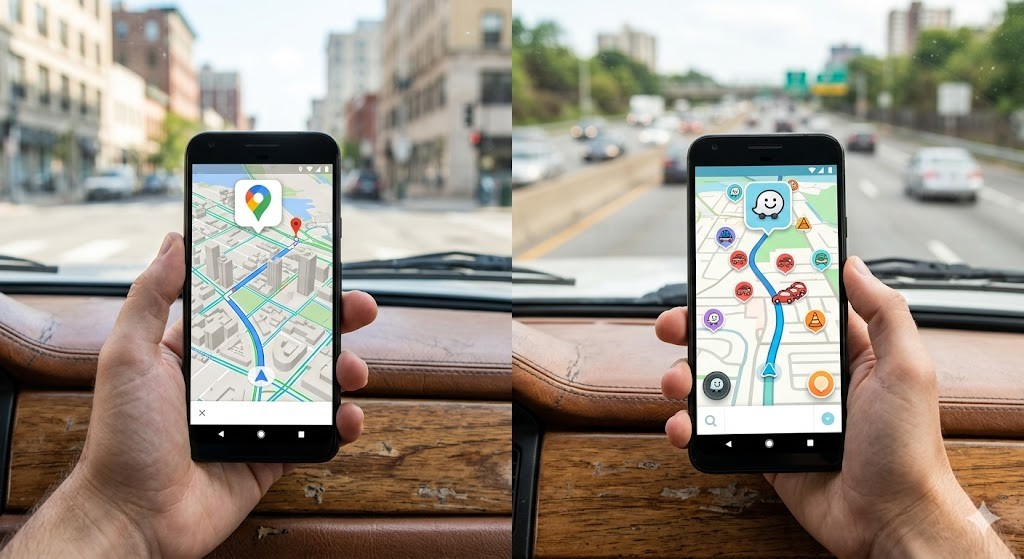

Navigation technology has fundamentally transformed how we interact with our physical environments. For Android users, the choice between major mapping applications often comes down to a battle between two industry giants. This comprehensive analysis delves deep into the strengths, weaknesses, and operational differences of Google Maps and Waze. Understanding the nuances of each platform is essential for maximizing efficiency and safety during daily commutes and long-distance travels.
Both applications provide essential routing services, leveraging vast databases of geographic information and real-time traffic data. However, their underlying philosophies differ significantly. Google Maps focuses on comprehensive integration with the Google ecosystem, offering a broad suite of features ranging from business listings to street-level imagery. Conversely, Waze prioritizes community-driven traffic updates and social elements, aiming to keep drivers on the road as quickly as possible. This article explores these distinctions in detail, providing Android users with the knowledge needed to select the tool that best fits their specific needs.
Whether you are a daily commuter, a long-distance traveler, or someone who simply prefers exploring new routes, the decision between these two applications impacts your daily routine. We will examine the technical architecture, user interface design, data privacy implications, and performance metrics to offer a clear verdict. By the end of this guide, you will possess a thorough understanding of which application serves your Android device best in various scenarios.
🚀 Core Architecture and Data Sources
The backbone of any navigation application lies in its data infrastructure. Google Maps and Waze operate on different models, which influences the accuracy and reliability of the routes they suggest. Google Maps benefits from Google’s extensive resources, including satellite imagery, Street View data, and a vast network of location data from Android devices globally. This integration allows for highly accurate mapping and business information.
Waze, on the other hand, relies heavily on a crowdsourcing model. Users actively report incidents, police presence, road hazards, and traffic congestion directly through the app. This creates a dynamic, community-driven map that can adapt to sudden changes faster than traditional mapping services. While Google Maps is excellent for general exploration and location discovery, Waze excels in real-time traffic avoidance.
📡 How Data is Collected and Processed
Data collection methods distinguish the two platforms significantly. Google Maps aggregates passive data from billions of Android devices, analyzing speed and location history to determine traffic flow. This method is less intrusive but relies on statistical probability. Waze requires active participation from users, who must manually input reports. This creates a more detailed but potentially less consistent data set depending on user density in a specific area.
The processing algorithms also differ. Google Maps uses machine learning to predict travel times based on historical patterns and current conditions. Waze uses real-time peer-to-peer communication to alert drivers of immediate hazards. This makes Waze particularly effective for avoiding accidents or police checks, whereas Google Maps is superior for planning trips based on business hours or transit options.
🔍 Integration with Google Ecosystem
For Android users, Google Maps offers seamless integration with the operating system. It is often the default application for location services across various apps, including ride-sharing services and restaurant finders. This integration means that location permissions are managed centrally, often reducing battery drain compared to third-party apps. Waze, while owned by Google, operates as a distinct entity with its own account system and permission requirements.
🎯 Navigation Accuracy and Traffic Management
Accuracy in navigation is the primary function of any map application. Both Google Maps and Waze strive to provide the fastest route, but their methods for calculating this route vary. Google Maps considers multiple factors including distance, speed limits, and historical traffic data. Waze focuses almost exclusively on minimizing travel time by constantly recalculating based on live user reports.
In heavy traffic scenarios, Waze often finds shortcuts that Google Maps might miss. These shortcuts are typically residential streets or less traveled roads that drivers have reported as being clear. However, this can sometimes lead to routes that pass through residential neighborhoods, which may not be ideal for all drivers. Google Maps tends to stick to main roads, providing a more predictable experience.
🚦 Real-Time Traffic Updates
Real-time traffic data is critical for modern commuting. Google Maps provides color-coded traffic layers on the map, showing congestion levels in real-time. This visual representation helps users understand the severity of delays. Waze provides similar data but integrates it with voice alerts and visual warnings for specific incidents. The Waze interface highlights police, accidents, and objects on the road with icons, providing a more alert-focused experience.
Performance metrics indicate that Waze updates route suggestions more frequently when congestion is detected. This aggressive recalculation can sometimes be jarring for users who prefer a stable route plan. Google Maps is more conservative, only suggesting route changes when the time saved is significant. This stability is often preferred for long-distance trips where frequent rerouting can cause confusion.
🛣️ Route Options and Preferences
Both applications offer route preferences, but the depth of customization differs. Google Maps allows users to avoid tolls, highways, or ferries. This is useful for drivers who want to save money or avoid complex junctions. Waze offers similar options but adds the ability to avoid specific streets or report hazards to influence future routing. The Waze community actively filters routes based on reported conditions, whereas Google Maps relies on aggregated data.
🛠️ User Interface and Experience Design
The user interface (UI) plays a crucial role in the usability of navigation apps. Google Maps features a clean, minimalist design that prioritizes readability on small screens. The interface is consistent across Android versions, ensuring that users familiar with the app find it intuitive. The layout is designed to reduce clutter, focusing on the map and essential controls.
Waze adopts a more colorful and gamified approach. It uses bright icons and animations to engage users. While this can make the app feel more lively, it can also be distracting for some drivers. The interface is designed to keep the driver informed about community activity, showing nearby Wazers and recent reports. This social aspect is unique to Waze and fosters a sense of community among users.
📱 Screen Layout and Readability
On Android devices, screen size and resolution vary significantly. Google Maps scales well across different screen sizes, maintaining the legibility of text and icons. The map tiles are optimized for quick loading, ensuring smooth panning and zooming. Waze also adapts to different screens but places a higher emphasis on large, bold text for voice instructions. This ensures that critical information like turn-by-turn directions is visible even at a glance.
🎨 Visual Themes and Customization
Waze allows for some customization of the map colors and night mode settings. This is useful for users who prefer a darker interface to reduce eye strain during night driving. Google Maps offers a dark mode that integrates deeply with the Android system theme. This system-level integration ensures that the app matches the overall look and feel of the device, providing a cohesive user experience.
🚀 Features and Advanced Capabilities
Both applications have evolved beyond simple turn-by-turn navigation. They now include features for public transit, ride-hailing, and local business discovery. Understanding these additional features is key to choosing the right app for your lifestyle.
✨ Key Features Overview
Public transit integration is a standout feature in Google Maps. It provides detailed schedules, platform information, and real-time arrival updates for buses and trains. This makes it an essential tool for users who rely on public transportation. Waze focuses primarily on driving and does not offer comprehensive public transit data, limiting its utility for multimodal commuters.
Ride-hailing integration is available in both apps. Google Maps allows you to request rides from various providers directly from the map interface. Waze integrates with specific ride-sharing services, allowing users to find carpool matches or request rides. The depth of integration varies by region, so users should check local availability.
🔊 Voice Guidance and Alerts
Voice guidance is critical for safe driving. Both apps offer customizable voice prompts. Google Maps allows users to choose from various voices and languages, often including the option to download offline voice packs. Waze features a more interactive voice system that can include community-generated warnings. This adds a layer of realism to the navigation experience.
📍 Offline Capabilities
Offline functionality is essential for areas with poor connectivity. Google Maps allows users to download specific map areas for offline use. This includes turn-by-turn navigation and some business information. Waze also offers offline map downloads, but the functionality is more limited compared to Google Maps. Offline maps in Waze are primarily for route planning but may not include all the real-time updates available online.
📊 Key Points and Performance Analysis
To provide a clear comparison of the technical specifications and performance metrics, the following table summarizes the key differences between the two applications.
| Feature | Google Maps | Waze |
|---|---|---|
| Primary Focus | Comprehensive Navigation | Traffic Avoidance |
| Data Source | Passive Aggregation | Crowdsourced Reporting |
| Offline Maps | Extensive Support | Limited Support |
| Public Transit | Integrated | Not Available |
| Community Features | Reviews and Photos | Incident Reports |
| Battery Usage | Optimized | High Usage |
This table highlights the strategic positioning of each application. Google Maps is designed as a general-purpose tool for exploring the world, while Waze is specialized for drivers. The battery usage difference is significant, as Waze requires more frequent updates and active reporting, which can drain the battery faster. Google Maps is generally more efficient in terms of power consumption, making it better for long trips where battery life is a concern.
🛡️ Security and Privacy Considerations
Privacy is a growing concern for Android users. Google Maps collects significant data on user location and behavior to improve services. This data is used to personalize search results and advertisements. Users can manage their location history through the Google Account settings to control how much data is stored. Waze also collects location data for routing and reporting purposes. Since Waze is owned by Google, the data policies are similar, but the specific use cases differ.
🛠️ Potential Risks
Using navigation apps involves certain risks. Relying solely on Waze for route planning might lead to unfamiliar residential streets, which could pose safety risks in low-light conditions. Google Maps tends to prioritize main roads, which are generally safer and better lit. Additionally, relying on crowd-sourced data can sometimes lead to incorrect reports, causing unnecessary rerouting. Users should always use their judgment and verify the route visually when possible.
🆚 What Distinguishes It from Competitors?
The primary distinction between Google Maps and Waze lies in their core algorithms. Google Maps uses a predictive model based on historical data, while Waze uses a reactive model based on current user input. This means Waze is better at reacting to sudden events like accidents or police stops, whereas Google Maps is better at predicting routine traffic patterns. For a daily commuter, Waze might save more time, but for a traveler exploring a new city, Google Maps provides more context.
📊 Pros and Cons Analysis
To provide a balanced view, we analyze the advantages and disadvantages of each application based on real-world usage scenarios.
✅ Advantages of Google Maps
Google Maps offers superior offline capabilities, allowing users to navigate without an internet connection. This is a critical feature for travelers in remote areas. The integration with other Google services, such as Calendar and Gmail, allows for seamless trip planning. The public transit information is unmatched in the industry, making it the best choice for urban commuters who use multiple modes of transport.
- ✅ Comprehensive offline mode for travel in remote locations
- ✅ Deep ecosystem integration with Android and Google services
- ✅ Superior public transit data for multimodal commuting
- ✅ Lower battery consumption compared to Waze
❌ Disadvantages of Google Maps
Google Maps can be less responsive to sudden changes in traffic conditions compared to Waze. The route suggestions are sometimes slower to recalculate when an accident occurs on the current path. The interface, while clean, can lack the engaging community features that some users enjoy. For drivers who want to be the first to know about road hazards, Google Maps may feel less proactive.
- ❌ Slower reaction to live incidents in heavy traffic
- ❌ Limited community interaction compared to Waze
- ❌ Less frequent rerouting during congestion
- ❌ Privacy concerns due to extensive data collection
✅ Advantages of Waze
Waze excels in real-time traffic management, often finding faster routes than Google Maps during peak hours. The community-driven reporting system keeps users informed about police, accidents, and hazards. The gamification elements, such as points for reporting, encourage active participation. This creates a vibrant ecosystem where users feel invested in the accuracy of the map.
- ✅ Real-time incident reporting from the community
- ✅ Aggressive rerouting to save time in traffic
- ✅ Community features that enhance user engagement
- ✅ Detailed voice alerts for road hazards
❌ Disadvantages of Waze
Waze consumes more battery and data due to its constant communication with the server. The reliance on community reports means that in rural areas, the app may not have enough data to function effectively. The interface can be distracting for some drivers due to the colorful design and social elements. Offline capabilities are limited, making it less reliable for international travel.
- ❌ High battery and data usage during navigation
- ❌ Dependence on active user base for accuracy
- ❌ Limited offline functionality for map downloads
- ❌ Potential for distraction from social features
💻 System Requirements and Performance
Both applications are lightweight enough to run on most modern Android devices. However, performance can vary based on hardware specifications. The following table outlines the recommended specifications for optimal performance.
| Component | Minimum | Recommended | Performance Impact |
|---|---|---|---|
| Android Version | Android 6.0 | Android 10+ | Newer versions offer better battery optimization |
| RAM | 2 GB | 4 GB+ | More RAM prevents app crashes during heavy use |
| Storage | 100 MB | 500 MB+ | Essential for caching map data and offline files |
| GPS | Standard | High Precision | Improves accuracy of location tracking |
For users with older devices, Google Maps is generally more lenient regarding system resources. It handles background processes more efficiently, reducing the impact on overall device performance. Waze requires more active processing for route calculations and data syncing, which can slow down devices with limited RAM or older processors.
🔍 Practical Guide for Setup and Usage
Setting up either application is straightforward, but optimizing it for your needs requires attention to detail. Follow these steps to ensure the best experience.
🧩 Installation and Configuration
Begin by downloading the application from the Google Play Store. Ensure that location permissions are granted to the app to allow for accurate navigation. In the settings menu, configure your home and work addresses for quick access. Enable voice guidance and select a language that is comfortable for you. It is also recommended to enable notifications for traffic alerts and route changes.
- 1) Download and Install: Search for the app in the Play Store and tap install.
- 2) Grant Permissions: Allow location access when prompted for accurate tracking.
- 3) Set Preferences: Configure route options like avoiding tolls or highways.
- 4) Enable Notifications: Turn on alerts for traffic and incidents.
- 5) Test Drive: Take the app for a short test trip to verify voice and map accuracy.
🛡️ Common Errors and Troubleshooting
Users may encounter issues such as the GPS signal being weak or the app failing to update the route. If the GPS signal is weak, try moving to an open area away from tall buildings. If the app fails to update, check your internet connection and refresh the map. Clearing the app cache can also resolve many performance issues.
- ⚠️ GPS Signal Lost: Check location services settings and enable high accuracy mode.
- ⚠️ App Crashes: Update the app to the latest version or reinstall it.
- ⚠️ Slow Performance: Close other background apps to free up RAM.
- ⚠️ Incorrect Route: Recalculate the route manually or report the issue to the community.
📈 Performance and User Ratings
User satisfaction varies depending on individual needs. Google Maps generally receives higher ratings for reliability and feature completeness. Waze receives high praise for its traffic management capabilities. Both apps maintain high ratings on the Play Store, indicating general user approval.
- 1) Average Rating: Google Maps holds a consistent 4.5-star rating, while Waze holds a 4.6-star rating.
- 2) Positive Feedback: Users appreciate the ease of use and the detailed information provided.
- 3) Negative Feedback: Some users report battery drain on older devices or occasional routing errors.
- 4) Trend Analysis: Waze usage has increased in urban areas, while Google Maps remains the standard for general navigation.
🆚 Best Available Alternatives
While Google Maps and Waze are the leaders, there are other options available. Apple Maps is an alternative for iOS users but is not available on Android. HERE WeGo offers robust offline maps and is a good backup option. TomTom Go is another professional choice for drivers who prioritize accuracy over community features. However, for most Android users, Google Maps and Waze remain the top choices due to their ecosystem integration and active user bases.
💡 Tips for Maximum Performance
Optimizing your navigation experience involves adjusting settings and habits. Keep the app updated to benefit from the latest features and bug fixes. Use the dark mode to reduce eye strain during night driving. Download offline maps before you travel to avoid data charges. These simple steps can significantly improve your daily navigation experience.
- ✅ Enable Low Power Mode: Reduces background activity to save battery.
- ✅ Download Offline Maps: Ensures navigation works without internet.
- ✅ Use Dark Mode: Reduces blue light exposure at night.
- ✅ Clear Cache: Prevents storage issues and improves speed.
🏁 Final Verdict
In conclusion, both Google Maps and Waze offer exceptional value for Android users. Google Maps is the better choice for those who need comprehensive travel information, public transit data, and offline capabilities. It is the more stable and reliable option for general use. Waze is the superior choice for drivers who prioritize saving time in traffic and want to be part of a community that keeps roads safe. It excels in real-time updates and route optimization.
For most users, having both apps installed is the best strategy. Use Google Maps for exploration and public transit, and Waze for daily driving commutes. This approach leverages the strengths of each application to ensure you are always on the best possible route. The choice ultimately depends on your specific needs and preferences, but both are highly recommended tools for modern navigation.
❓ Frequently Asked Questions
- 1) Which app uses less battery? Google Maps generally uses less battery than Waze due to its less aggressive background processing and data syncing requirements.
- 2) Can I use these apps offline? Yes, both apps support offline maps, but Google Maps offers more extensive offline features including public transit data.
- 3) Is Waze better for traffic? Yes, Waze is often better at avoiding traffic due to its community-driven reporting system.
- 4) Do I need a Google account for Waze? No, you can use Waze with a Waze account, but linking it to Google provides some benefits.
- 5) Which app has better public transit info? Google Maps has superior public transit information, including schedules and platform numbers.
- 6) Can I report accidents on both apps? Yes, both apps allow users to report accidents, but Waze focuses more heavily on this feature.
- 7) Is Google Maps better for tourists? Yes, Google Maps is better for tourists due to its Street View and business listing features.
- 8) Do these apps work in airplane mode? No, they require an internet connection for real-time updates, except for downloaded offline maps.
- 9) Are the maps up to date? Both apps update frequently, but Google Maps updates are more consistent globally.
- 10) Can I switch between apps easily? Yes, you can have both installed and switch based on your current driving needs.






I am not positive where you’re getting your info, but good topic.
I needs to spend some time studying much more or understanding
more. Thanks for magnificent info I used to be searching for this information for
my mission.
Discover ann online casino website designed for simple access, useful information, aand enjoyazble entertainment.
Discover casino games, real money options, bonuses, payment
methods, annd practical guides in one organized place.
Clewar navigation makes it easy to compare features, understand basic rules,
and find relevant content. The sitye offers a positive
experience for seeking repiable casino information, helpful
tips, and responsible online gaming conent today.